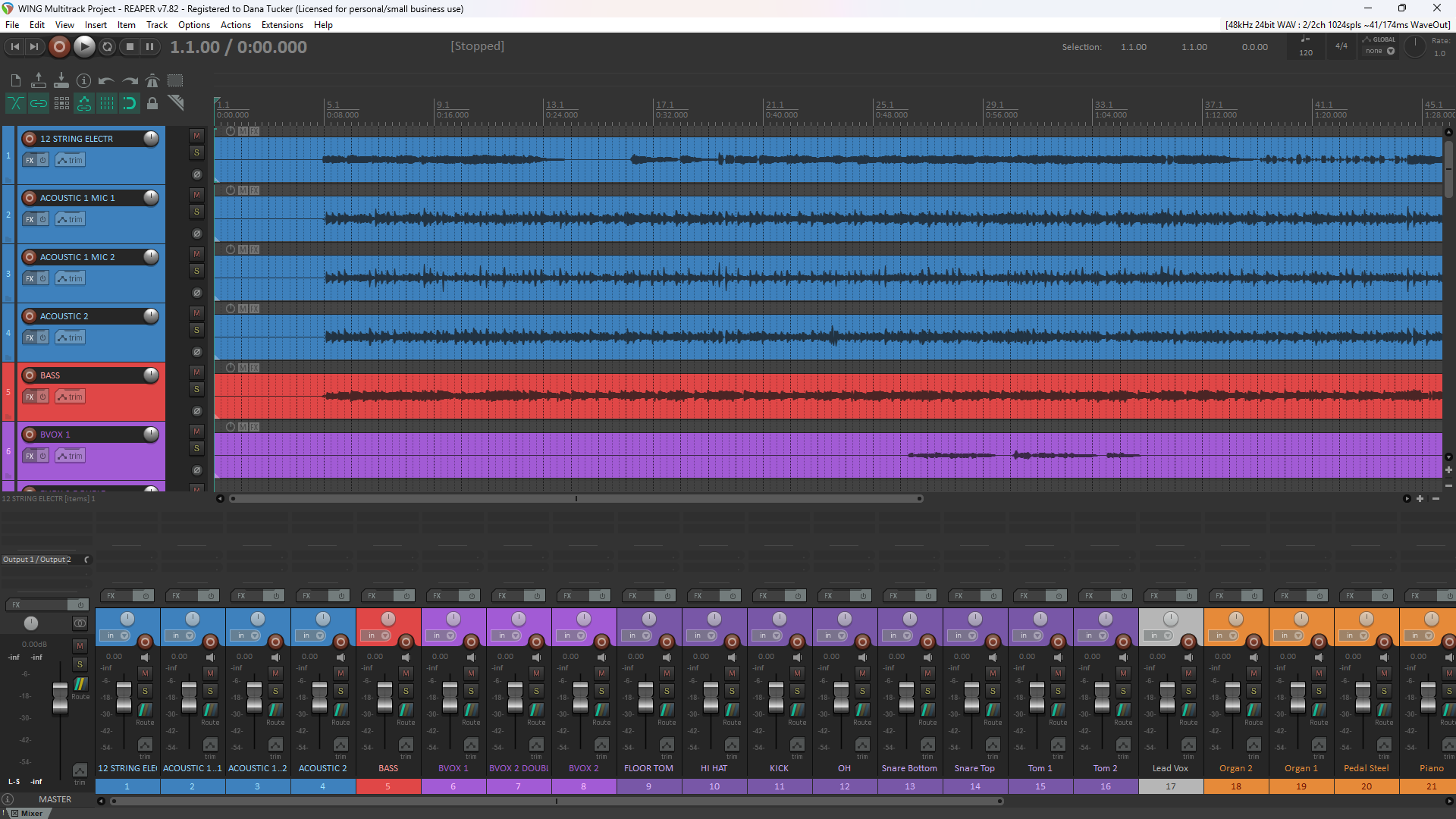
This project began with a simple idea: Could we create software that would take multitrack recordings from the Behringer X32, Midas M32, and Behringer WING digital mixers and automatically organize them into individual audio tracks, complete with the correct channel names and recording information? What started as an idea has grown into two Windows applications designed to help audio engineers, churches, worship teams, musicians, and recording studios save time and better understand their recordings.
Imagine finishing a live recording, loading your mixer scene or snapshot along with your multitrack audio files, and letting the software do the tedious work of separating, naming, and organizing your tracks. Instead of spending valuable time preparing a recording session, you can concentrate on what matters most: producing a great mix! That’s exactly what we’ve been developing!
Two Digital Mixer Platforms — Two Dedicated Programs!
Although the X32/M32 and WING mixers share many audio concepts, their recording formats and mixer configuration files are different. That’s why we’ve developed two separate applications, each designed specifically for its respective mixer platform.
X32/M32 Multitrack Manager
The X32/M32 Multitrack Manager is designed for the Behringer X32 and Midas M32 series digital mixing consoles. Using your mixer scene information and X-LIVE multitrack recordings, the program can automatically separate recorded audio into individual WAV files, identify the corresponding channel names, and create an organized REAPER project. The program also reads recording marker information and generates an Excel workbook containing detailed recording and track information.
One of the most impressive results during our testing was its processing speed. The program successfully processed more than one hour of 32-channel multitrack audio in just 43.02 seconds! That represents a tremendous time savings compared with manually preparing a large multitrack recording.
WING Multitrack Manager
The WING Multitrack Manager was developed specifically for the Behringer WING digital mixing platform. The WING uses a different recording and snapshot structure, so this application does much more than simply separate multichannel recordings. By examining your WING snapshot, the program can identify recording assignments, channel names, channel colors, routing information, and numerous mixer settings.
It can create individual WAV tracks, an organized REAPER project, an eight-worksheet Excel workbook, and HTML reports that help explain the mixer’s signal paths and configuration. This makes it useful not only for organizing recordings but also for studying mixer setups, troubleshooting routing questions, and preparing for virtual soundcheck.
From Multitrack Recordings To Your Favorite DAW!
Both applications are designed to eliminate much of the repetitive work involved in preparing multitrack recordings for mixing. Rather than manually separating audio channels and naming every track, you can use the appropriate program to prepare the recordings for your digital audio workstation.
REAPER users benefit from automatically generated project files, while users of other compatible DAWs can import the individual WAV tracks. Most importantly, the original recorded audio is preserved without applying additional EQ, compression, effects, or other audio processing.
Detailed Recording Reports and Mixer Information
A recording contains more information than just the audio itself. Depending on which mixer you’re using, the software can help identify track assignments, channel names, recording markers, and other details that would otherwise require manual investigation. The X32/M32 program produces an Excel workbook containing track information and recording markers.
The WING program goes further by examining snapshot information and producing detailed reports about recording assignments, signal paths, channel parameters, configured processors, and virtual soundcheck. For someone troubleshooting another engineer’s recording or mixer configuration, that information can be extremely valuable.
Designed for Churches, Audio Engineers, and Recording Studios
I’ve spent nearly 50 years working with analog and digital audio equipment, and one thing I’ve learned is that good audio begins with understanding your equipment and signal flow. My goal with these programs is not simply to make recording files easier to manage. I also want to provide tools that help people learn more about the mixers they’re using. Whether you’re a volunteer operating sound at your church, an experienced live sound engineer, or someone recording a band in your home studio, I hope these applications make your work a little easier.
Simple to Use — No Programming Required!
Both programs are designed as standalone Windows applications. You don’t need to know Python, write computer code, or purchase additional software to use the multitrack managers. Simply select the application designed for your mixer, load the appropriate scene or snapshot and recording files, review the available information, and export your project. The applications handle the organization and file creation for you.
Message From Dana
These programs are offered free of charge by D & L Recording Studio LLC in loving memory of my wife, Elizabeth (Liz) Tucker. Liz and I shared a passion for helping churches and others improve their audio systems. Continuing that work and making useful audio resources available to others is one way I can honor her memory.
There are no subscription, fees or software purchase requirements. My hope is that these programs save you time, help you better understand your recordings, and allow you to spend more time doing what we all enjoy — mixing great audio! Humbly, Dana Tucker. D & L Recording Studio LLC.
Download Your Multitrack Manager
We’ve created separate information and download pages for each application so you can learn about its capabilities and select the program that matches your mixer.
Behringer WING Multitrack Manager
Behringer X32 / Midas M32 Multitrack Manager